
SafeRide360
SafeRide360 appears to be a developing platform focused on transportation safety or mobility-related services, though the exact offering is not clearly defined on the current website. The site seems to be in an early or placeholder stage, built on WordPress, and includes basic sections such as benefits, directory pages, and contact information. While the name suggests a solution related to safe transportation, fleet management, or travel assistance, the content doesn’t yet specify the product scope or features. Based on the available details, SafeRide360 is likely in its setup or branding phase and may later evolve into a more structured service once the platform is fully launched.
Swift. Safe. Seamless
Saferide360’s internet and GPS based technology allows for fast response to booking requests. Assign drivers and deploy vehicles instantly. Safetrax protects your interests by protecting your employees, students and merchandise through preventive and corrective measures. These include live tracking, collecting real-time data on routes such as traffic jams and accidents, and SOS alerts to passengers. Safetrax provides a seamless experience by synergizing all fleet operations with its technology.
Salient Features

Live Tracking
A mesh of two simple technologies, GPS tracking, and an Internet connection. This enables users to track a vehicle regardless of distance. However, the same feature has different applications for different kinds of users.
Auto-Routing
SafeRide360 takes both internal and external factors into account and auto-generates optimized routes. This makes re-adjusting routes easy in case of any absentees. Unlike manual routing, auto-routing is completely error-free.
Rostering
Keeping track of passengers, vehicles, and drivers for scheduling rides doesn’t need to be a time-consuming exercise. Safetrax automates rosters by simply adding the shift details of employees.

E-Safe
The E-Safe feature monitors driver behavior to give you an exact picture of every trip. If the driver speeds, brakes hard, or turns too sharply, the admin will be alerted instantly.
Replay
You can view the tracking history of a vehicle and get to know its whereabouts within the selected time frame. Moreover, the location pins are updated every minute.
Admin Dashboard
This enables you to keep a 360-degree view of all transport operations. The platform facilitates easy scheduling, live tracking, speed & SOS alerts, reporting, and more.
Driver App
Empower drivers with functionalities such as live tracking, intelligent routing, masked calling, SOS trigger buttons, and more. Using the app, drivers can access stop-wise employee data as well.
Passenger App
Fosters better communication between employees, drivers, and transport admins. Additionally, employees can also live track their trips, receive ETAs, access SOS buttons, rate and share feedback for drivers and vehicles.
How It Works
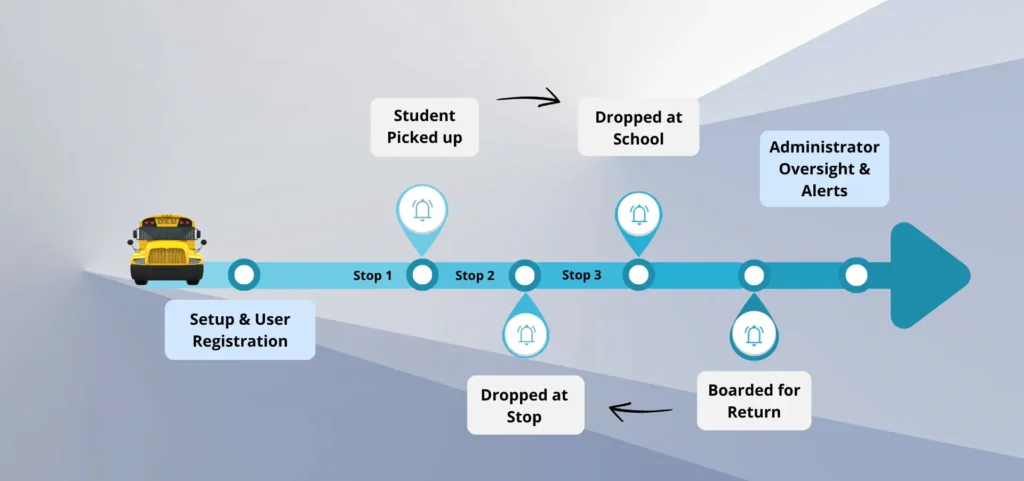
🚌 Flow Overview
->School Bus Departs from School
->Bus En Route — Real-Time Tracking & Delays
->Bus Approaching / Arriving at Stop
->Student Boards — Smart-Card Swipe
->Bus Reaches School — Arrival Notification
->Evening / Return Journey
->Emergency / Contingency Handling
🚌 Flow Overview
->Student Data Onboarding
->Route Creation & Planning
->Auto / Manual Daily Trip Generation
->Live-Trip Tracking & Dashboard
->SOS / Emergency Alerts
->After-School / Ad-hoc Trip Handling
->Early-Leave Student Management
->Reports & Analytics